Changelog

Follow new updates and improvements to Melo.

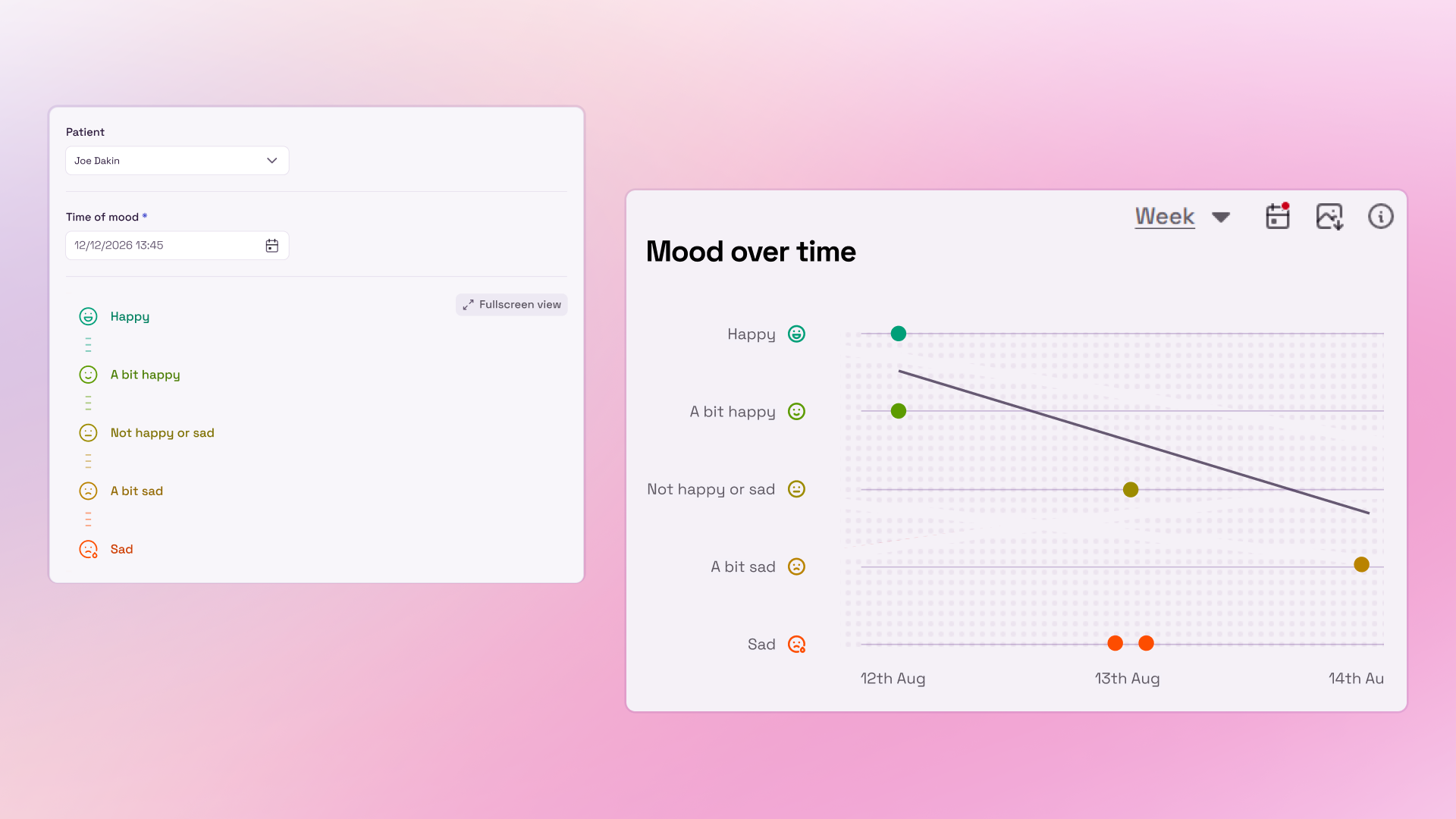
A New Way to Capture How Your Patients Are Feeling

This update introduces a new way to capture patient-led insights, alongside improvements that make Melo more personalised and easier to use. From recording how patients are feeling over time to creating your own default view, these changes are designed to make everyday workflows simpler while giving clinical teams richer information to work with.

💙 Capturing Patient Perspective

The new Mood Scale gives clinicians a simple way to capture how patients are feeling each day using a standardised rating scale. By adding patient-led data alongside clinical assessments and observations, it provides an additional insight into wellbeing and helps build a more complete picture of the patient over time.

Interested in using the Mood Scale framework? Get in touch with your customer success manager to get started.


🔎 Your Filters, Your View

Filters now persist across logins, so Melo remembers your preferences and lets you create a default view that works for you.


💡 Clearer Guidance

We’ve added and improved tooltips and labels throughout the platform, making it easier to understand features and find the information you need.


🛠️ Fixes & Improvements

We’ve also made a range of smaller improvements and bug fixes to keep Melo running smoothly.


Your feedback helps shape Melo. If there’s something you’d like to see improved, a feature you’d love us to add, or simply something you think we should know, we’d love to hear from you at support@melo.health.

See More from Every Assessment

This week’s update focuses on helping you get more value from their assessment data, with new export functionality, clearer edit tracking, and a series of usability improvements designed to support analysis, reporting, auditing and everyday clinical workflows.

📤 Export Assessments to CSV

A highly requested feature is now live. You can now export behavioural assessments to CSV, making it easier to analyse data outside of Melo, support internal reporting, audits, and evidence patterns across patients, wards or sites. This gives greater flexibility to how you use assessment data, helping turn recorded observations into clearer insight and more actionable evidence.


📝Last Edited By

Patient assessments now show who last edited them, improving transparency, accountability and confidence in your data.


🐞Bug Fixes & Improvements

A series of smaller enhancements and fixes have been made to improve platform stability, usability and overall workflow performance.


As always, Melo is guided by real clinical experiences and feedback. We welcome your input on what would make Melo even more valuable for you and your team

See the Bigger Picture, All in One Place

From patient-level data to site-wide visibility, our new Site Dashboard gives a clearer overview of activity across wards and locations.

Tailored to your feedback, this update supports a clearer system-wide view of behaviour, helping teams identify patterns earlier, uncover emerging pressure points, and respond more proactively. Alongside the dashboard, we've also introduced improvements to patient discharging, reporting, documentation, and data sharing to make everyday workflows smoother and more efficient.

🏥 Introducing the Site Dashboard

Gain a clearer view of your service with the new Site Dashboard, bringing together patient status, assessment activity, behaviour trends alongside site and ward-level insights in one place. New interactive charts help you identify behavioural patterns, track assessment activity and uncover emerging trends, empowering teams to make more informed, proactive decisions across wards and sites.


🚪 Improved Patient Discharge Process

Discharging is now clearer than ever. A new dropdown allows you to select from predetermined list of discharge reasons. An “Other” option is also available where a custom reason can be entered manually


📝 Patient background Box Styling

Updates to the patient background box now includes improved formatting options, including underline, bold, bulleting and numbered lists.


🖨️ Print Behaviour Page

Updates have been made to the Behaviour Page chart provides automatic scaling when sent to print, streamlining use.


As always, Melo is continuing to develop with your feedback. The Site Dashboard is part of an ongoing development that we welcome you to be part of! Please don’t hesitate to let us know what would make this feature even more useful for you and your organisation.

Earlier updates